RF AND IF ENGINEERING · SAW FILTER KNOWLEDGE HUB
A surface acoustic wave (SAW) filter selects the wanted frequency band and attenuates unwanted signals in an RF or intermediate-frequency path. Successful integration depends on the passband, port terminations, measurement setup and PCB working together.
FCom Fuji Crystal · Technical Guide
Choose your next SAW filter guide
Follow the four stages for a new design. For an unexpected hardware response, start with measurement and then review the layout.
1. Principles
Understand piezoelectric conversion and the different roles of filters, resonators and sensing devices.
2. Selection
Translate signal coverage, blockers, loss limits and interface conditions into a candidate shortlist.
3. Measurement
Set reference planes and evaluate transmission, reflection, bandwidth and group delay with a VNA.
4. PCB layout
Review matching, RF returns, input-to-output coupling and protection-device loading on the board.
1. Understand SAW filtering
SAW devices use a piezoelectric substrate and patterned electrodes to couple electrical signals with acoustic motion near the surface. Electrode geometry, material properties and device architecture shape the frequency response. [1]
A SAW filter is selected for its transmission response across a band. A SAW resonator provides a resonance for use in a suitable circuit. Neither device alone is a complete oscillator or a source of power gain.
Mark the wanted band, transition regions and principal interferers before comparing parts. Review amplitude variation and, where the signal requires it, phase or group-delay variation. Center frequency alone cannot describe the complete response.
Still deciding on a filter technology? See SAW Bandpass Filters vs. BAW, LC and Other Technologies.
Before moving on: sketch the signal path and identify whether the filter operates at RF or IF.
2. Define the selection requirements
Build a requirements sheet before choosing a package or frequency label. Compare guaranteed limits separately from typical curves and record the conditions under which each requirement must hold.
| Parameter | What to specify or verify |
|---|---|
| Frequency coverage | Wanted lower and upper frequencies, signal uncertainty and required design margins. |
| Bandwidth | Band edges, attenuation threshold and whether the reference is peak-relative or absolute. |
| Passband quality | Maximum insertion loss, ripple, return loss and relevant group-delay limits over the stated band. |
| Stopband attenuation | Minimum rejection at each specified frequency or interval, with the attenuation reference defined. |
| Port conditions | Source/load impedance, balanced or unbalanced topology and required matching circuit. |
| Environment and power | Operating temperature and permitted RF input conditions for the exact ordering code. |
| Mechanical integration | Package, pin functions, land pattern and assembly requirements. |
Bandwidth definitions must agree. A span measured 3 dB below peak transmission differs from a span meeting an absolute insertion-loss limit. Check the datasheet reference before comparing values. [2]
Include matching components in the loss budget. Their Q and tolerances can affect the assembled response; equal nominal inductance does not establish equal RF performance. [3]
Before moving on: compare candidates using the same fields, units and test conditions. Flag requirements without supporting data.
3. Establish a repeatable measurement
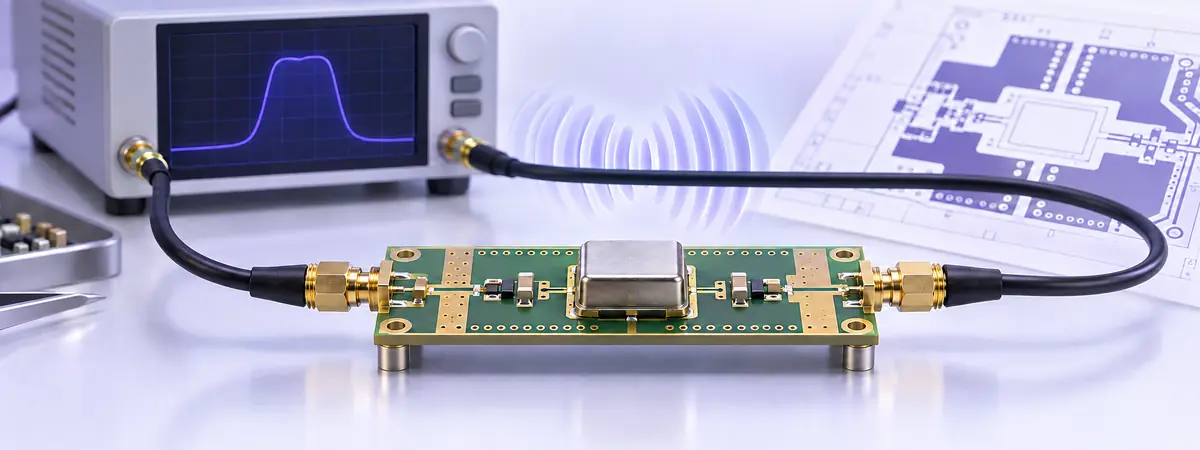
A vector network analyzer (VNA) measures transmission and reflection. For a conventional single-ended two-port setup, S21 describes forward transmission; S11 and S22 describe input and output reflection. Balanced interfaces require an appropriate connection and mixed-mode measurement approach. [4]
- Define the boundary. State whether connectors, fixture sections and matching components belong to the reported result.
- Match the port conditions. A VNA with 50 Ω ports does not make every filter a directly matched 50 Ω device.
- Calibrate the required ports. Account for connections between the calibration planes and the specified network.
- Capture the full response. Check passband loss, ripple, band edges, reflection and every required stopband interval. Confirm adequate measurement dynamic range before accepting deep rejection.
- Record the setup. Save fixture revision, matching values, temperature, source power, span, point count, IF bandwidth and calibration details.
Group delay describes how transmission phase changes with frequency. Its displayed value depends on aperture and noise, so record the aperture when comparing traces. A delay-only port extension does not remove arbitrary fixture mismatch. [5]
Before moving on: retain raw data and annotated plots so another engineer can reproduce the result.
4. Verify PCB layout and ESD protection
Start with the exact device’s footprint and reference layout. Treat the filter, matching network, grounds and nearby routing as one RF assembly.
- Design transmission-line geometry for the actual PCB stackup and required impedance.
- Keep matching parts close to the relevant pins and provide short RF return paths.
- Separate input and output routing to limit coupling that can bypass the filter.
- Follow the manufacturer’s ground-pin and keep-out guidance; verify every pin against the drawing.
- Reserve access for measurement and matching adjustments during prototype evaluation.
Where ESD protection is required, evaluate RF loading and discharge-current routing together. Place protection close to the exposed entry point, minimize return-path inductance and avoid long branches from the signal trace to the protection pin. [6]
Measure with the intended protection and matching components fitted. If the response differs from the reference, compare test boundaries, assembly and routing before attributing the change to the filter.
Complete the loop: repeat the relevant measurements after layout, matching or protection changes and document the accepted configuration.
Find FCom SAW filter candidates
Use the FCom SAW filter catalog to browse package families and available frequency options. Practical starting points include:
A family page is a screening tool. Confirm the complete ordering code, current datasheet revision, matching circuit and guaranteed conditions before choosing a replacement or approving a design.
Frequently asked questions
Which guide should I read first?
For a new design, follow principles, selection, measurement and layout in order. If hardware already shows an unexpected response, start with the measurement guide and confirm the test conditions before reviewing the PCB.
Can I select a SAW filter by center frequency alone?
No. Define the complete passband, rejection mask, loss budget, interfaces and operating conditions. Ask for clarification where the exact datasheet does not cover your acceptance criteria.
Why can two measurements of the same filter differ?
Different port impedances, matching networks, reference planes and fixture corrections change the reported response. Align these conditions, source power and temperature before comparing traces; align aperture for group delay as well.
Discuss your SAW filter requirements with FCom
Send the wanted band, bandwidth definition, maximum insertion loss, rejection mask, source/load impedances, temperature range, input power and package constraints. For measurement support, include the schematic, matching values, fixture details and traces.
Email: FCom@fujicrystal.com
Technical references
- Murata: SAW device technology and operating principles.
- Keysight: Filter Measurements — bandwidth references, insertion loss and ripple.
- Murata: SAW filter matching and inductor loss.
- Keysight: Measuring an Unbalanced-Balanced Bandpass Filter.
- Keysight: Comparing the VNA Delay Functions.
- Texas Instruments: ESD Protection Layout Guide (PDF), SLVA680A, Revision A, April 2022.